Using Atlas Architecture in ASP.NETIf your application has dynamic pages which require partial page refreshing or your application has many client side validations and mouse events, then you can very well use Microsoft’s Atlas framework in your ASP.NET application. This framework allows you to create and implement many high level features using Ajax (Asynchronous Javascript and XML).
This article
gives you an introduction on Atlas Architecture. Atlas has Client Side
components and Server Side Components which when integrated and used by
your webpage, solves the purpose of creating responsive and dynamic pages.
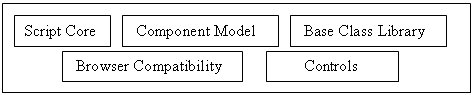
On the Client Side, Atlas provides the following:
Script Core offers extended object oriented features like inheritance, interface, classes, abstraction and many others. Your javascript code can implement these features and work like .NET Objects Component Model is the heart of Atlas architecture. You can design your webpage with many advanced objects and not just HTML tags. Component model has HTML DOM as its base and appends additional features like data binding to it. Though this layer is advantageous, it complicates the web page design as well. Base Class Library provides APIs which when used makes your javascript code easy to develop and maintain. .NET Framework already has a base class library and this layer is an add-on to it. Few APIs provided by this Base Class Library include StringleBuilder, IDisposable and Event. It also has WebRequest and WebResponse objects which are on top on XMLHttpRequest object. Security services (e.g. authentication) are also provided. Browser Compatibility makes your code compatible across all browsers. No need for including browser specific code in your application. Controls are user interface elements provided by Atlas UI framework. You can append additional rules and logic to the existing controls and also define rules for validating these controls. If you are using these client side features provided by Atlas, then your server side code should have the possibility to integrate with it. This integration can be achieved using Server Side Atlas features which are broadly classified into web page extensions and atlas services. They are discussed below:
Script Manager associates Atlas Script Libraries to your code. If you have any Atlas script code in your page, then it automatically generates the corresponding client side code. Server Controls allows you to create and use your own Ajax featured controls. Control Extensions help you in extending semantics of already existing ASP.NET controls.
Web Services help in establishing asynchronous callbacks using javascript proxies. Atlas supports both ASP.NET and windows communication foundation web services. Application Services ensure interaction between client side code and server side code to establish security through authentication and profile management. Data Services ensure data binding in your server side code. With these components offered by Atlas, you can very well create a high-end application with all advanced features.
|